Beste Language-Reactor- Alternative: Sabi
Zuletzt aktualisiert:
Streaming-basierte Sprachimmersions-Tools sind extrem beliebt geworden, da sie es Lernenden ermöglichen, Serien und Videos in Lerneinheiten zu verwandeln. Zwei bekannte Optionen sind Language Reactor und Sabi, doch es gibt große Unterschiede in dem, was sie bieten, wie sie Nutzer unterstützen und wie gut sie sich in eine echte Sprachlernroutine einfügen. In diesem Vergleich beleuchten wir die wichtigsten Unterschiede und helfen Ihnen zu entscheiden, welches Tool besser zu Ihren Zielen passt.
Wenig Zeit? Hier ist ein schneller Überblick über den Vergleich.
🆚 Kurzvergleich: Sabi vs. Language Reactor
Funktion | Sabi | Language Reactor |
|---|---|---|
Netflix | ✅ | ✅ |
YouTube | ✅ | ✅ |
Disney+ | ✅ | ❌ |
Prime Video | ✅ | ❌ |
Rakuten Viki | ✅ | ❌ |
Dual-Untertitel | ✅ | ✅ |
Wortübersetzungen | ✅ | ✅ |
Übungen im Video | ✅ | ❌ |
KI-Untertitel (ASR) | Netflix, YouTube, Disney+, Viki | Netflix |
Entwickler-Support | Aktiv / Häufig | Schlecht / Langsam |
Monatspreis | Kostenlose Testversion / 1,84 € | Kostenlos / 2,89 € |
🧠 Überblick: Was ist was?
Language Reactor
Language Reactor ist eine Chrome-Erweiterung, die Videountertitel auf Plattformen wie Netflix und YouTube erweitert und Dual-Untertitel, Wörterbücher und weitere unterstützende Funktionen hinzufügt, um Ihnen das Lernen mit authentischen Inhalten zu erleichtern.
Sabi
Sabi ist eine Chrome-Erweiterung, die mit Netflix und YouTube sowie Disney+, Prime Video und Rakuten Viki funktioniert. Sie geht zudem über reine Untertitel hinaus, indem sie das Anschauen in interaktive Sprachpraxis verwandelt – mit Übungen, die auf dem basieren, was Sie gehört haben.
📺 Plattformunterstützung
Language Reactor
— Funktioniert primär als Chrome-Erweiterung für Desktop-Browser
— Unterstützt Dual-Untertitel und Wörterbuchfunktionen für Netflix und YouTube
👉 Einschränkungen:
— Konzentriert sich hauptsächlich auf Netflix und YouTube
— Berichten zufolge gibt es Probleme mit Support und Updates, die bei vielen Nutzern zu Fehlern und Bugs führen
Sabi
— Unterstützt Netflix, YouTube, Disney+, Prime Video und Rakuten Viki
— Integriert sich nahtlos in den Videoplayer der Streaming-Plattform
✨ Vorteil:
— Mehr Plattformvielfalt bedeutet abwechslungsreichere Inhalte zum Lernen, besonders wenn Sie auch Serien abseits von Netflix/YouTube mögen
📚 Lernerlebnis
Language Reactor

Fokus: Untertitel + Wörterbuch-Erweiterungen
— Dual-Untertitel für Kontext und Verständnis
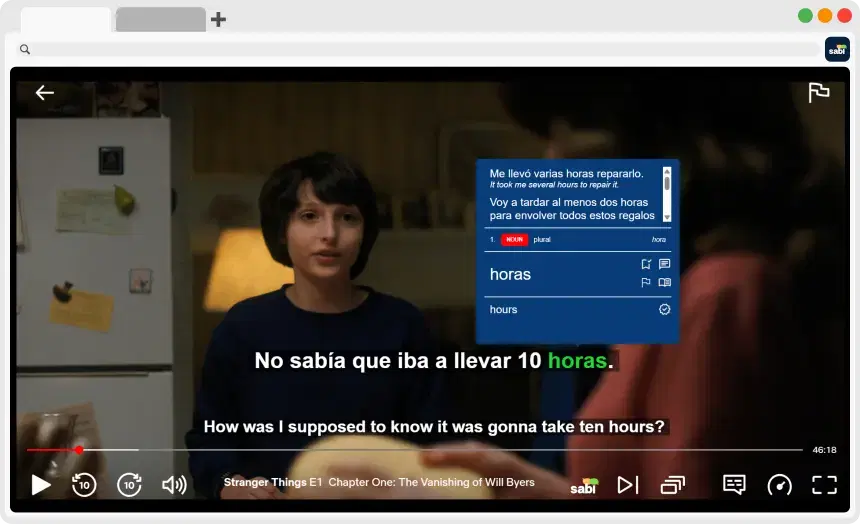
— Popup-Wörterbuch und Wortnachschlagefunktion
— Auto-Pause und Wiedergabesteuerung helfen, schwierige Abschnitte zu verlangsamen
— Einige Premium-Funktionen wie vollständig maschinell übersetzte Untertitel erfordern ein kostenpflichtiges Abo
📉 Einschränkungen:
— Enthält keine strukturierten Übungen zur Wiederholung (wie Sprechen oder Schreiben)
— Festigt hauptsächlich Hör- und Leseverständnis durch Untertitel
— Bei vielen Funktionen (auch Premium) berichten Nutzer häufig von Bugs und Fehlern, die oft nie behoben werden
Sabi
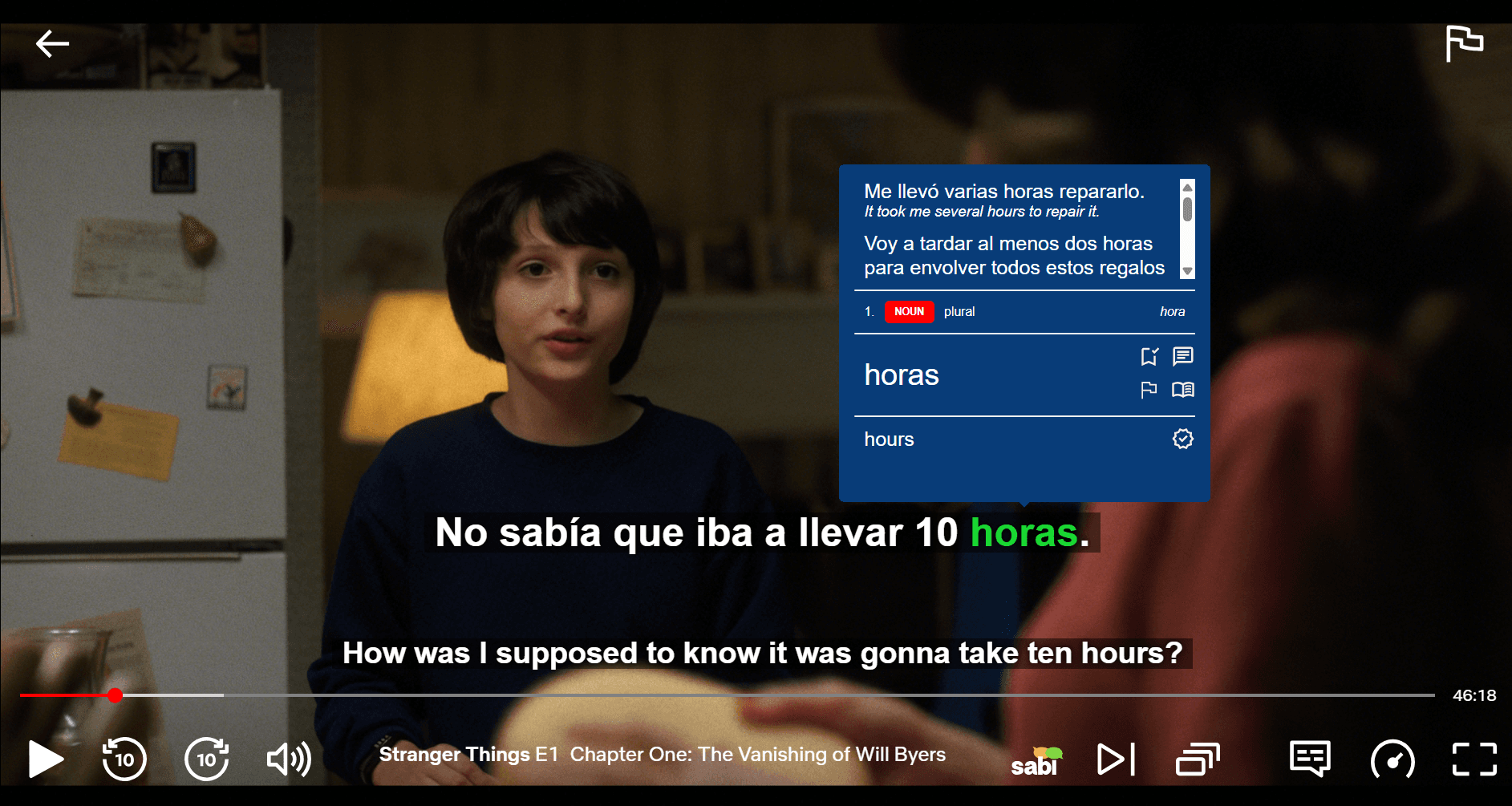
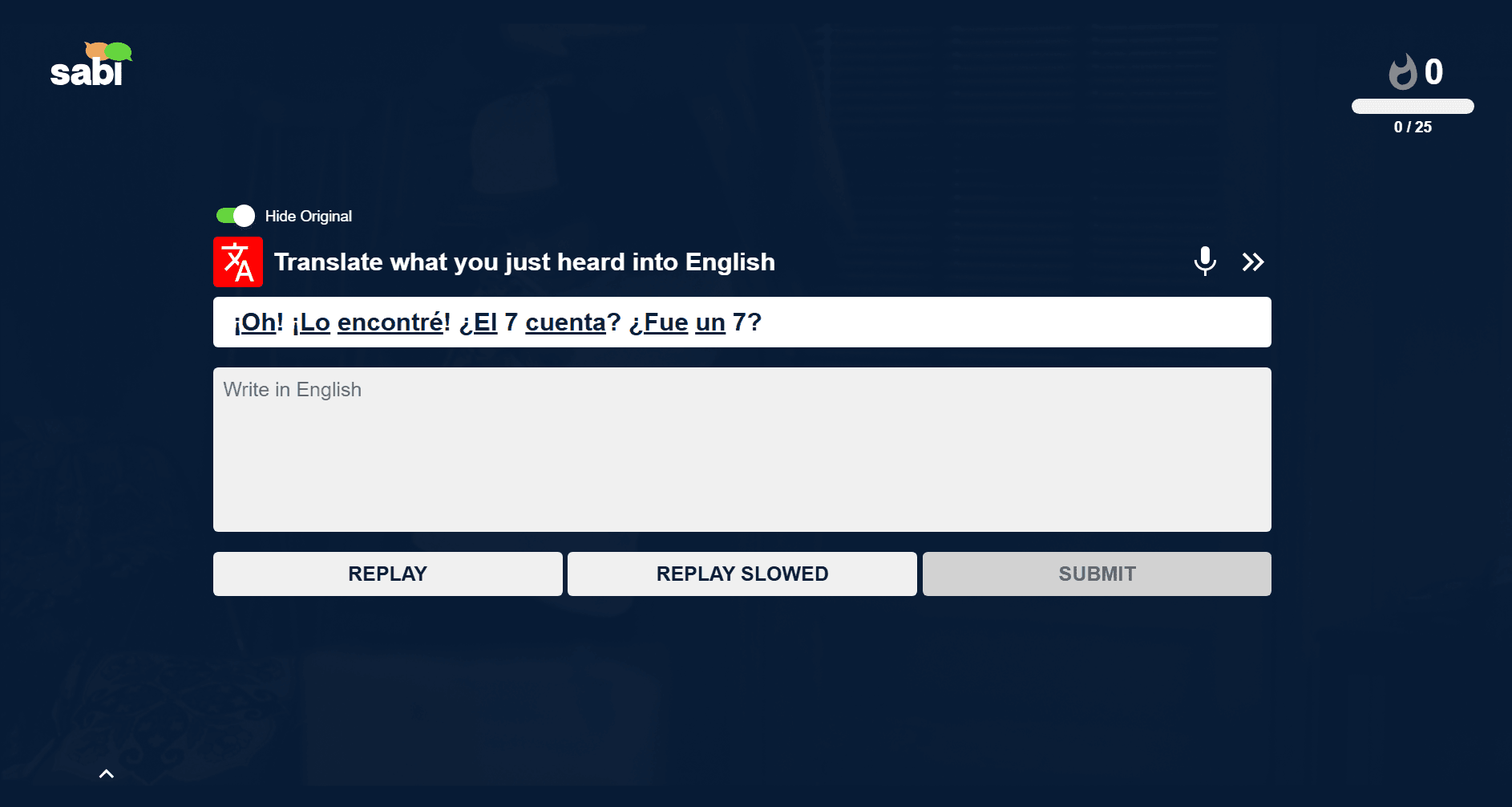
Fokus: Aus Zuschauen wird aktives Lernen
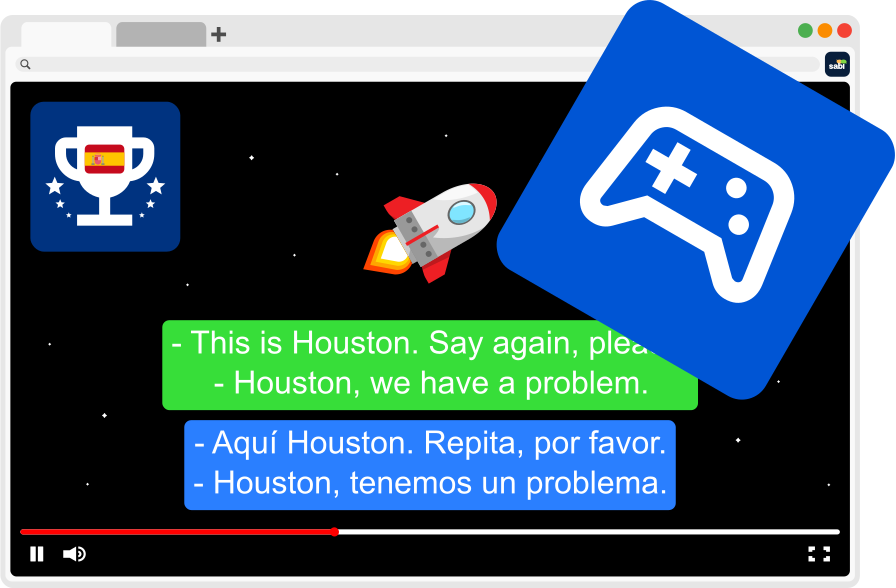
— Interaktive Übungen erscheinen während des Zuschauens (z. B. Lückentext, Multiple Choice) und stehen nach der Sitzung zur Wiederholung zur Verfügung
— Dual- und KI-generierte Untertitel für höhere Transkriptionsgenauigkeit
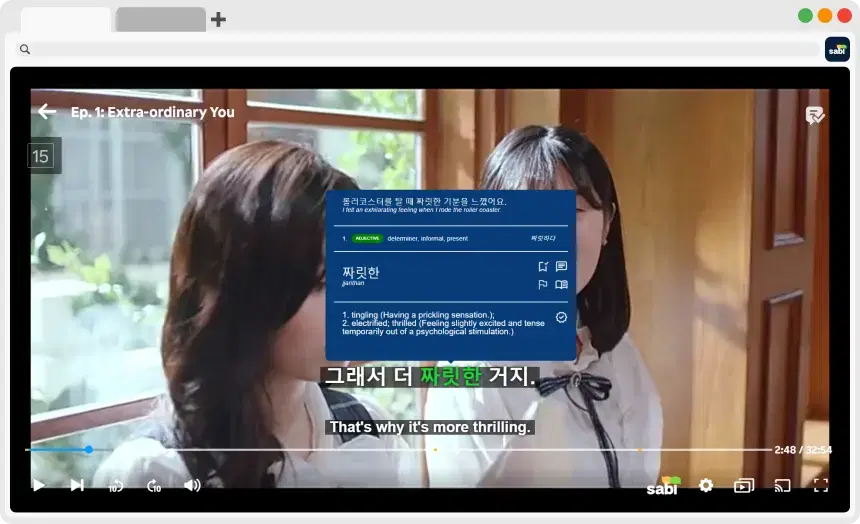
— Wörter nachschlagen, indem Sie mit der Maus darüberfahren — inklusive Übersetzung, Grammatik und Beispielsätzen
— Übungen passen sich an das Gesehene an, wie ein Spiel, das schwieriger wird, je besser Sie werden
🔥 Vorteil:
— Statt nur Untertitelinfos anzuzeigen, testet und festigt Sabi aktiv, was Sie gelernt haben, um Behalten und aktives Abrufen zu verbessern
🎨 Design & Benutzeroberfläche
Language Reactor
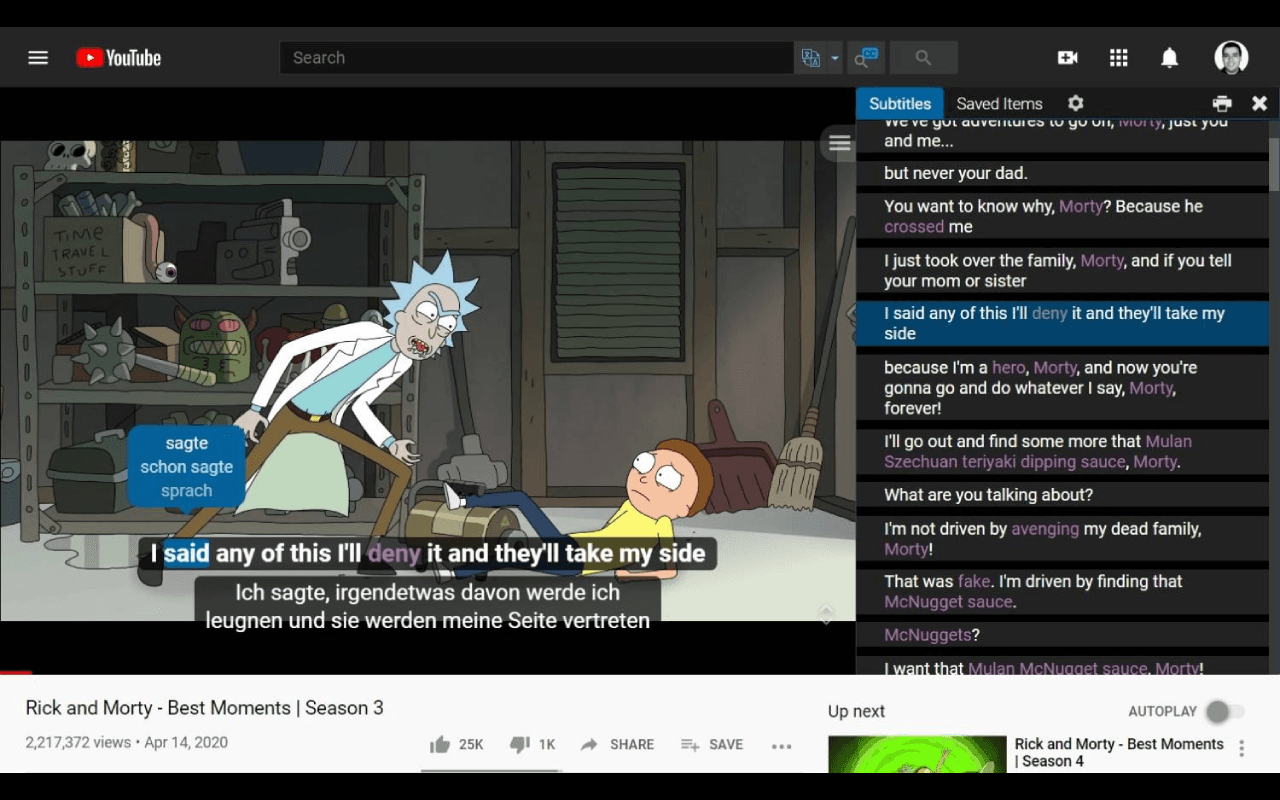
— Traditionelle Erweiterungs-Oberfläche, integriert in Videoplayer
— Manche Nutzer empfinden es als etwas technisch und veraltet
— Weniger intuitiv für Lernende, die ein reibungsloses, geführtes Erlebnis wünschen
📱 Einschränkungen der Oberfläche:
— Fokussiert auf technische Untertitel-Anpassungen statt auf eine reibungslose und angenehme Lernumgebung
Sabi
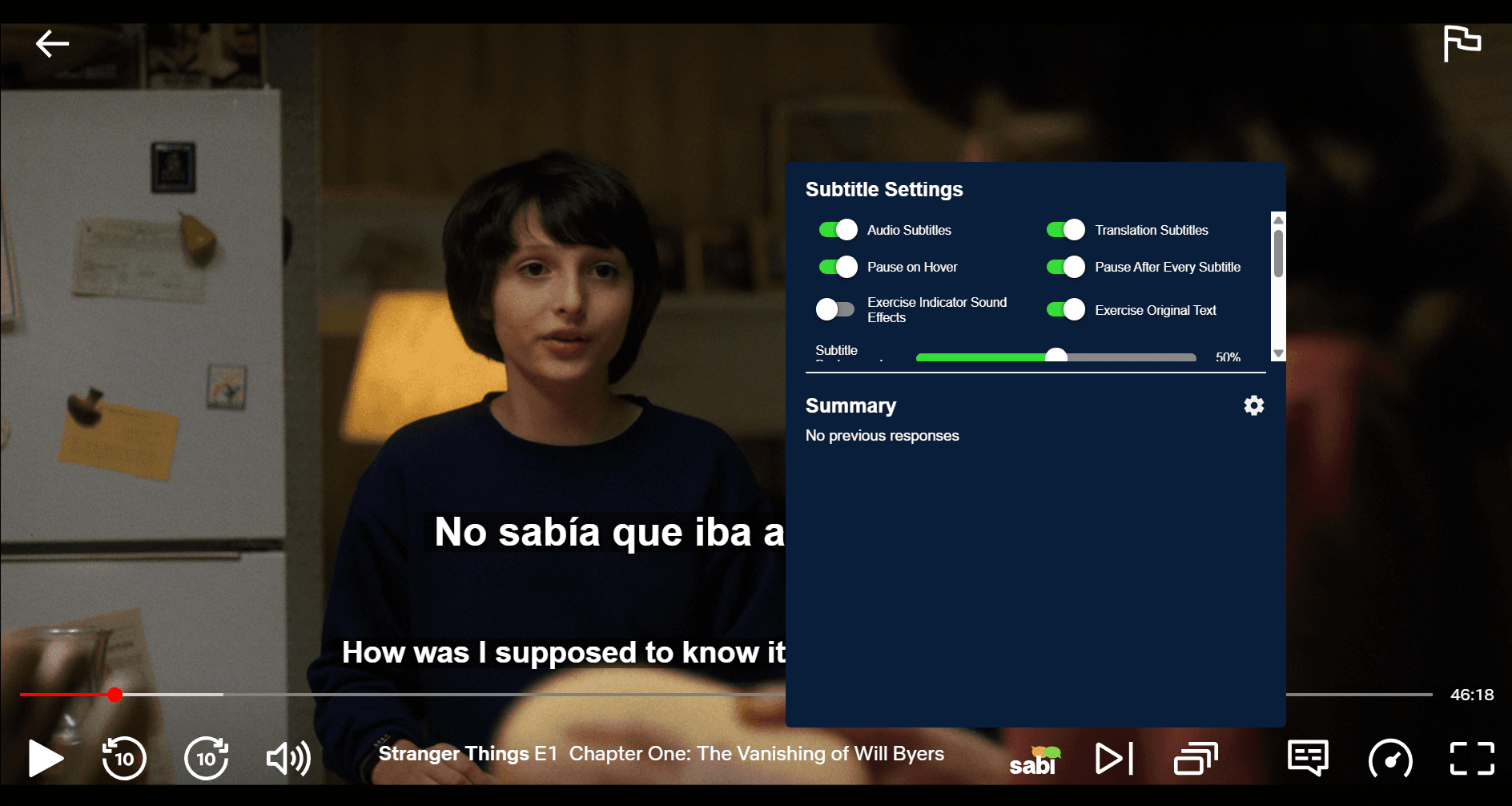
— Entwickelt mit Blick auf Unterhaltung und Lernen zugleich
— Moderneres, spielerisches UI mit Fokus auf Nutzererlebnis
— Zeigt Übungen und Übersetzungen auf ansprechende Weise, statt rein informativer Overlays
✨ UI-Vorteil:
— Lernende empfinden Sabi oft als ansprechender, da es Lernmechaniken mit dem Zuschauen verbindet, statt nur Untertitel anzuzeigen
💸 Preisgestaltung
Language Reactor
— Freemium-Modell: Kernfunktionen sind kostenlos
— Kostenpflichtiges Abo für erweiterte Funktionen wie vollständig maschinell übersetzte Untertitel, unbegrenztes Speichern von Wörtern und erweiterte Exportoptionen
— Setzt voraus, dass Sie bereits Streaming-Abos für Inhalte haben
Sabi
— Bietet eine kostenlose Testversion mit vollem Zugriff auf alle Funktionen, keine Zahlungsinformationen erforderlich
— Kostenpflichtiges Abo für weiteren Zugriff
— Erfordert ebenfalls eigene Streaming-Abos
💡 Vergleich:
Beide sind relativ günstig, aber Sabi konzentriert sich auf Übung und Festigung, während Language Reactor hauptsächlich Untertitelfunktionen erweitert
✅ Vor- und Nachteile
Language Reactor
✅ Vorteile:
— Einfach zu bedienen für Dual-Untertitel und Wörterbuch-Overlays
— Funktioniert mit Netflix & YouTube
— Solide kostenlose Version mit grundlegenden Untertitel-Tools
❌ Nachteile:
— Begrenzte Plattformunterstützung, keine Integration mit Disney+, Prime Video oder Viki
— Oberfläche wirkt auf viele Nutzer technisch und veraltet
— Es fehlen strukturierte Übungen wie Karteikarten oder Interpretationsübungen
— Entwicklungs- und Update-Tempo sehr langsam
Sabi
✅ Vorteile:
— Interaktives Lernen, da Sie beim Zuschauen getestet werden
— Unterstützt mehr Plattformen (Netflix, YouTube, Disney+, Prime, Viki)
— Behebt nicht übereinstimmende oder fehlende Untertitel, indem Whisper-KI-Untertitel basierend auf dem tatsächlich Gesagten generiert
— Adaptive Methoden fördern den Fortschritt und verbessern das Behalten
— Modernes, ansprechendes UI, das sich mehr wie ein geführtes Lerntool anfühlt
— Integrierte Übungstools über reine Untertitel hinaus
— Günstigerer Abo-Preis
— Häufige Updates und durchgängiger Entwickler-Support
❌ Nachteile:
— Kleinere Nutzerbasis im Vergleich zum etablierten Language Reactor
— Erfordert ein kostenpflichtiges Abo für weiteren Zugriff
❓ Häufig gestellte Fragen
Wird Language Reactor noch weiterentwickelt?
Language Reactor hat in letzter Zeit nur sehr wenige Updates erhalten, und viele Nutzer beklagen sich über Bugs und Fehler, die immer noch nicht behoben wurden. Wenn Sie eine moderne, aktiv gepflegte Alternative suchen, sollten Sie sich Sabi mit seinen Dual-Untertiteln, sofortigen Übersetzungen und interaktiven Übungen ansehen.
Wie viel kostet Language Reactor?
Language Reactor bietet eine kostenlose Version mit Grundfunktionen sowie eine Pro-Version für etwa 2,89 € pro Monat (im Jahresabo). Sabi bietet ähnliche Dual-Untertitel- und Wörterbuchfunktionen mit interaktiven Übungen, KI-Untertiteln und einer moderneren Oberfläche zu einem deutlich niedrigeren Preis von 1,84 € pro Monat (im Jahresabo) und ist damit die günstigere Wahl.
Mit welchen Plattformen funktioniert Language Reactor?
Language Reactor unterstützt derzeit nur Netflix und YouTube. Es funktioniert nicht mit anderen großen Streaming-Diensten wie Disney+, Amazon Prime Video oder Rakuten Viki. Für ein Tool, das mit allen fünf Plattformen funktioniert und Dual-Untertitel, sofortige Übersetzungen und interaktive Übungen bietet, probieren Sie Sabi.
Funktioniert Language Reactor mit Disney+?
Nein, Language Reactor ist nicht mit Disney+ kompatibel. Um Dual-Untertitel, sofortige Übersetzungen und interaktive Übungen bei Disney-Filmen und -Serien zu erhalten, benötigen Sie die Sabi-Browsererweiterung.
Funktioniert Language Reactor mit Prime Video?
Nein, Amazon Prime Video wird von Language Reactor nicht unterstützt. Wenn Sie beim Schauen auf Prime Video eine Sprache lernen möchten, sollten Sie sich Sabi mit seinen Dual-Untertiteln, sofortigen Übersetzungen und interaktiven Übungen ansehen.
Funktioniert Language Reactor mit Rakuten Viki?
Nein, Language Reactor funktioniert nicht mit Viki. Für Nutzer, die Dual-Untertitel, sofortige Übersetzungen und interaktive Übungen auf Viki möchten, ist Sabi die beste Wahl und bietet volle Unterstützung im Viki-Videoplayer.
Gibt es eine Alternative zu Language Reactor?
Ja! Die beste Alternative ist Sabi. Es bietet alle Kernfunktionen von Language Reactor (Dual-Untertitel, gespeicherte Wörter, Wörterbuch), ergänzt aber interaktive Übungen, funktioniert auf mehr Plattformen (Disney+, Prime Video, Rakuten Viki) und kostet fast die Hälfte der Pro-Version.
🏁 Fazit: Welches ist besser?
Wenn Ihr Ziel grundlegende Immersion und einfache Untertitel-Erweiterungen ist, ist Language Reactor ein solides, unkompliziertes Tool, das Ihnen Dual-Untertitel und schnelle Übersetzungen auf Netflix oder YouTube bietet.
Wenn Sie jedoch ein umfassendes Lernerlebnis wünschen, das Zuschauen mit aktivem Lernen verbindet (interaktive Übungen, Grammatikinfos, Unterstützung für mehr Streaming-Plattformen), dann ist Sabi in der Regel die stärkere Wahl für Lernende, die Unterhaltung in Fortschritt verwandeln möchten.